
How to Add ATS Keywords to Your Resume (+ Examples)

ATS keywords help employers find relevant skills, tools, credentials, and experience in your resume. Learn how to choose the right terms from a job description, place them naturally, and avoid keyword stuffing.
White stylized “CP” monogram on a red square background.

City Personnel Team

Share:

Facebook
LinkedIn
Email
Print
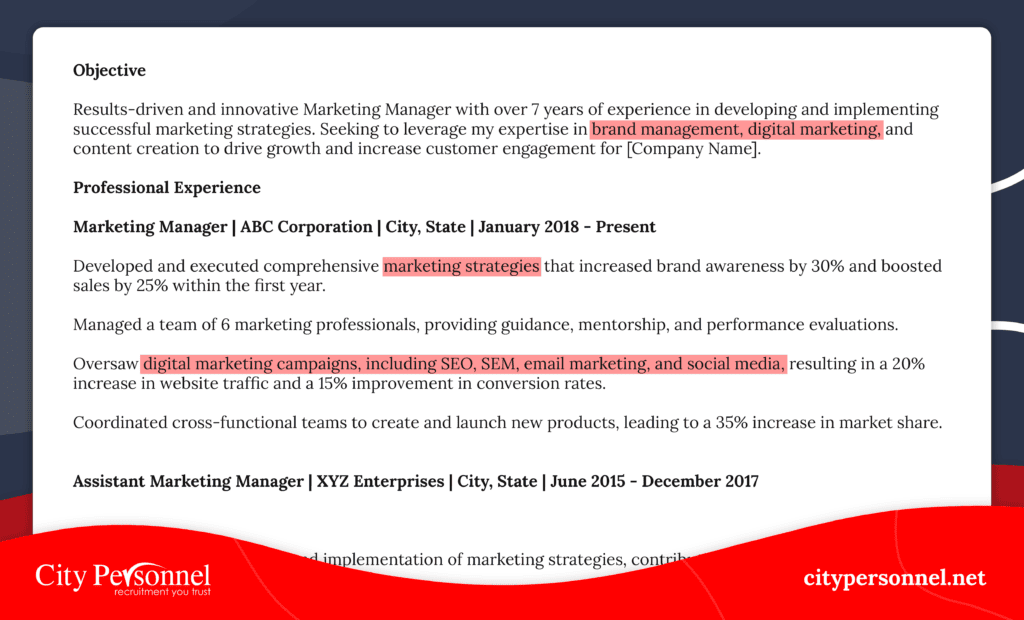
Job seeker highlighting ATS keywords in a resume and job description

How to Add ATS Keywords to Your Resume: Examples and Checklist

If a job posting says “calendar management,” your resume should not make a recruiter translate “kept executives organized.” When the employer’s wording accurately describes your experience, use it.

ATS keywords are the job titles, skills, tools, certifications, education requirements, and experience phrases an employer uses to find qualified applicants. To add them to your resume, pull the most important terms from one job description, match them to experience you actually have, and place them naturally in your summary, skills, work history, and credentials.

A keyword is not a magic password. It is a label for evidence. The strongest ATS-friendly resume does not simply repeat the job posting. It shows where, how, and how well you used the skills the employer needs.

The quick answer: how to add ATS keywords to a resume

01 Work from one specific job description, not a general list of popular resume words.
02 Highlight required skills, tools, credentials, job titles, and repeated responsibilities.
03 Separate the terms you can prove from the ones you do not have.
04 Use the employer’s exact wording when it is accurate, then support it with context or results.
05 Place keywords in your summary, skills section, work experience, and credentials where they belong.
06 Check that the resume is easy for both software and a person to read.

If you do not yet have a solid base resume, start with our guide on how to build a resume from scratch, then return here to tailor it.

What are ATS keywords?

ATS stands for applicant tracking system. Employers use these systems to collect applications, organize candidate information, and help recruiters search or filter resumes. Features vary by employer and software. A recruiter might search for “accounts payable,” filter for a required license, review answers to screening questions, or sort applicants by relevance.

ATS keywords are the terms that connect your resume to those searches and requirements. They usually fall into a few practical categories:

KEYWORD CATEGORY WHAT TO LOOK FOR IN THE POSTING EXAMPLES
Target role The job title and closely related titles Administrative Assistant, Staff Accountant, Customer Service Representative
Hard skills Specific work you must know how to do calendar management, account reconciliation, benefits administration
Software and tools Named platforms, systems, and equipment Microsoft Excel, QuickBooks, Salesforce, HRIS, EHR
Certifications and licenses Required or preferred credentials SHRM-CP, CPR certification, Notary Public, driver’s license
Industry language Terms commonly used in the field month-end close, insurance verification, e-filing, order processing
Education A degree, coursework, or training requirement associate degree, bachelor’s degree, accounting coursework
Languages and work requirements Requirements tied to the role bilingual Spanish, weekend availability, Rhode Island license

There is no universal list of ATS software keywords that works for every employer. The best list is inside the job description you are applying to. Generic terms can help you brainstorm, but the posting tells you what this hiring team values.

How do applicant tracking systems use keywords?

Most applicant tracking systems do more than count repeated words. Depending on the employer’s setup, the system may parse your resume into fields, allow recruiters to search the resume text, match your background with the job description, apply knockout questions, or filter for specific qualifications.

That is why two things matter at the same time:

Myth Check

You may have seen a claim that ATS software automatically rejects 75% of resumes. That figure is often repeated as if every system works the same way, but there is no universal rejection rate. Some employers use filters heavily. Others use the system mainly as a database. Your goal is not to beat a machine — it is to make your relevant experience easy to find and easy to trust.

How to find ATS keywords in a job description

Read the posting twice. On the first pass, understand the role. On the second, mark the language the employer is likely to search, filter, or evaluate.

1. Start with the required qualifications

Look for phrases introduced by “required,” “must have,” “minimum,” or “qualifications.” These terms usually deserve the most attention because they may be tied to screening questions or recruiter filters.

Examples include:

If you meet a requirement, make it unmistakable. If you do not meet it, do not add it just to pass a filter.

2. Mark named tools, systems, and methods

Software names make strong resume keywords because they are specific. Highlight platforms such as QuickBooks, Microsoft Excel, Salesforce, ADP, Workday, Epic, Clio, or Microsoft 365. Also mark processes such as bank reconciliation, data entry, invoice processing, or calendar management.

Use the most specific truthful term. “Created weekly reports in Microsoft Excel using PivotTables and XLOOKUP” is more useful than “good with computers.”

3. Notice repeated responsibilities

If “scheduling” appears in the summary, responsibilities, and qualifications, it is probably central to the role. Repetition is a signal, but it is not the only signal. A required credential may appear once and still be essential.

4. Separate required terms from preferred terms

Required qualifications should be easy to find. Preferred qualifications can help you stand out, but they should not crowd out the basics. Build your resume in this order:

01 Required qualifications you can prove
02 Core responsibilities you have performed
03 Preferred skills you genuinely have
04 Related strengths that add context

5. Build a simple keyword worksheet

Before editing your resume, put the terms into a quick worksheet. This keeps you honest and helps you turn a keyword into evidence.

JOB-DESCRIPTION PHRASE DO I HAVE IT? PROOF FROM MY EXPERIENCE BEST RESUME LOCATION
Calendar management Yes Managed calendars for five directors Summary and work history
Microsoft Excel Yes Built weekly reports using PivotTables Skills and work history
Confidential records Yes Maintained personnel files for 200 employees Work history
Bachelor's degree No Not applicable Do not add
Bilingual Spanish Yes Fluent in English and Spanish Summary and skills

This “match, prove, place” method is more reliable than pasting a long keyword list into your resume.

Where should ATS keywords go on a resume?

Keywords should appear where a recruiter expects to see them. A strong term buried in an unrelated section is less helpful than the same term connected to relevant experience.

Professional summary

Use two to four of the most important qualifications near the top. Focus on the target role, level of experience, specialty, and one or two high-value tools or skills.

Example

Administrative Assistant with four years of experience in calendar management, meeting coordination, confidential records, and Microsoft Office. Known for supporting fast-moving leadership teams and keeping schedules, documents, and client communication organized.

Skills section

Use a focused list of hard skills, tools, languages, and credentials that match the role. A skills section makes relevant terms easy to scan, but it should not be the only place they appear. Our guide to in-demand skills employers are looking for can help you identify strengths worth developing and demonstrating.

Example

Calendar Management | Microsoft Excel | Data Entry | Meeting Coordination | Records Management | Customer Service | Salesforce

Work experience

This is where keywords become credible. Use them inside accomplishment-focused bullets that explain your scope, actions, and results.

BEFORE

Helped the office run smoothly and assisted customers.

AFTER

Managed calendars and meeting schedules for a five-person leadership team, maintained confidential records, completed data entry in Microsoft Excel, and responded to more than 30 customer inquiries per day.

The stronger version includes relevant keywords, but it also gives the recruiter a clear picture of the work.

Education and certifications

Write credentials using the official name. If the posting uses an acronym, include both the full term and acronym once when space allows.

Projects or additional experience

If a required skill is current but does not appear in your recent jobs, a project, volunteer role, course, or portfolio section may provide honest evidence. Label the context clearly. Do not present coursework as paid professional experience.

ATS keyword examples by job type

Use these examples as prompts, not as a copy-and-paste list. Keep only the keywords that match the posting and your actual background.

JOB AREA POSSIBLE ATS RESUME KEYWORDS
Administrative support calendar management, meeting coordination, Microsoft Office, data entry, records management, travel arrangements, document preparation, customer service
Accounting and finance accounts payable, accounts receivable, bank reconciliation, QuickBooks, GAAP, general ledger, month-end close, financial reporting, invoice processing
Customer service inbound calls, customer relationship management, CRM, issue resolution, order processing, case documentation, customer retention, Salesforce
Human resources onboarding, benefits administration, employee relations, HRIS, payroll, recruiting, compliance, performance management, ADP, Workday
Healthcare administration patient scheduling, insurance verification, medical terminology, HIPAA, electronic health record, EHR, prior authorization, Epic
Legal support case management, e-filing, litigation support, document preparation, legal research, client intake, discovery, Clio
IT support Active Directory, Microsoft 365, ticketing system, technical troubleshooting, network support, service-level agreement, hardware installation

The phrase “IT keywords for resumes,” for example, can mean very different things for a help desk technician, systems administrator, or software developer. Use the job description to narrow the list to the tools, environments, and responsibilities that actually belong to the role.

How to turn a keyword into a strong resume bullet

Use these examples as prompts, not as a copy-and-paste list. Keep only the keywords that match the posting and your actual background.

BEFORE

Responsible for schedules and office tasks.

AFTER

Coordinated calendars, travel arrangements, and weekly meetings for three executives, reducing scheduling conflicts by 25%.

BEFORE

Handled invoices and bookkeeping.

AFTER

Processed more than 150 monthly accounts payable invoices in QuickBooks, reconciled vendor statements, and supported month-end close.

BEFORE

Answered customer questions.

AFTER

Resolved 40 or more daily customer inquiries by phone and email, documented cases in Salesforce, and maintained a 94% customer satisfaction score.

BEFORE

Helped new employees get started.

AFTER

Coordinated onboarding for 35 new hires, completed I-9 documentation, updated employee records in the HRIS, and scheduled benefits orientations.

BEFORE

Worked at the front desk and scheduled patients.

AFTER

Scheduled 60 or more patient appointments per week, completed insurance verification, updated records in Epic, and followed HIPAA privacy procedures.

Do not invent a number to make a bullet sound stronger. If you do not have a precise metric, describe the scope instead, such as team size, frequency, complexity, location count, or type of customer.

Should you use the exact words from the job description?

Yes, when the wording is accurate and natural. Applicant tracking systems and recruiters may not treat every synonym the same way. If the posting asks for “calendar management” and your resume says only “organized schedules,” use the exact phrase in at least one relevant place.

Keep these rules in mind:

What are personal keywords for a resume?

Searchers sometimes use “personal keywords for resume” to mean soft skills or personal qualities. Words such as hardworking, motivated, dependable, and team player are rarely persuasive by themselves. They are broad claims that many applicants make.

Turn the quality into evidence instead:

Claim → Evidence

Strong communicator — Explained billing questions to customers by phone and email, documented each case, and maintained a 94% satisfaction score.

Detail-oriented — Audited 300 employee records, corrected missing documentation, and brought files into compliance before the annual review.

If a job description lists communication, collaboration, leadership, or problem-solving, you can use that language. Support it with an example instead of leaving it in a list of adjectives.

How many ATS keywords should you include?

There is no ideal keyword count or keyword density. Include the important terms that meet all three tests:

01 The job description shows that the term matters.
02 The term accurately describes your experience or qualification.
03 Your resume provides enough context for a recruiter to understand it.

If a posting contains 12 relevant requirements and you can prove 10, make those 10 easy to find. Do not repeat each one five times. A key term can appear in a summary, skills list, and work bullet when each placement serves a purpose, but unnatural repetition makes the resume harder to trust.

Common ATS keyword mistakes to avoid

Copying the entire job description

Recruiters can recognize copied language. Select the terms that describe your background, then write original bullets that show your own scope and results.

Adding skills you cannot defend in an interview

A keyword may help your resume appear in a search, but it can also become the first interview question. If you cannot explain how you used it, leave it out.

Hiding keywords in white text

Do not hide a block of keywords by making the text white, tiny, or invisible. It can create parsing problems, look deceptive when selected or printed, and damage your credibility.

Putting every keyword in the skills section

A skills list shows relevance. Work history proves it. Put the most important skills in both places when you have real examples.

Using a keyword list instead of readable sentences

Your resume still has to persuade a person. Read each bullet aloud. If it sounds like a string of search terms, rewrite it.

Ignoring the rest of the resume

Keywords cannot rescue confusing dates, vague accomplishments, or cluttered formatting. Review what recruiters notice first on a resume and remove unnecessary details using our guide to what to leave off your resume.

Forcing a keyword into an employment gap

Use an honest entry for caregiving, education, contract work, or another relevant activity when appropriate. If you need help with the wording, see these examples for how to explain a gap in your resume.

Can AI help with resume keyword optimization?

AI can speed up the comparison between a job description and your resume. It is useful for extracting repeated terms, grouping required and preferred qualifications, spotting missing language, and suggesting clearer phrasing.

A practical prompt is:

Compare this job description with my resume. List the required skills, tools, credentials, job titles, and repeated responsibilities. Create two groups: terms my resume already proves and terms that are missing or unsupported. Do not add any qualification that is not present in my resume.

Then review every result yourself. AI can misread a requirement, flatten your voice, or suggest experience you do not have. Remove contact details and other sensitive information before uploading a resume to a tool you do not trust. Our guide on when and when not to use AI for your resume covers where the technology helps and where human judgment matters more.

ATS-friendly resume formatting checklist

Keywords work best when the system can parse the document correctly. Before you submit:

PROGRESS 0 / 10 done

Final ATS keyword checklist

Use this checklist for every application — tick each item as you go:

PROGRESS 0 / 15 done

Frequently asked questions about ATS resume keywords

The best ATS keywords are the required and repeated terms in the specific job description that accurately match your background. Prioritize the target job title, hard skills, software, certifications, education, and core responsibilities. There is no universal list that fits every job.

Use them where they make sense. Your summary can establish fit, your skills section can make tools and hard skills easy to scan, and your work history should prove the most important terms with examples. Credentials belong in education or certification sections.

Keep a strong base resume, but tailor a copy for each role. Job descriptions often use different language and priorities, even when the titles are similar. Small, truthful changes to your summary, skills, and most relevant bullets can make the match clearer.

Many systems can read text-based PDFs, but employers and platforms differ. Follow the file type requested in the application. Avoid scanned or image-only PDFs, and check that you can select the text before submitting.

Yes. AI can extract and group terms, but you must verify the results and decide which qualifications you can prove. Never let a tool add skills, credentials, or results that are not true.

No. Hidden keywords can create parsing issues and appear deceptive. Use only relevant terms in visible, readable content that gives a recruiter useful information.

There is no single rejection rate that applies to every applicant tracking system or employer. Some organizations use knockout questions and filters, while others use the ATS mainly to store and search applications. Accurate keywords and clear formatting help your information get found, but a human still needs to see a credible match.

Make the keywords lead somewhere

Ready to put your tailored resume to work?

The point of resume keyword optimization is not to make your resume sound more technical — it is to make your fit easier to recognize. When your resume is ready, browse City Personnel’s current job openings. A well-tailored resume helps us see where your experience fits, and our staffing services are free for job seekers.

Looking for work?

Connect with real employers in Rhode Island and Southern Massachusetts.

In this article
    Add a header to begin generating the table of contents

    Related Articles

    city personnel logo

    Login

    Are you looking for work?

    See a Full List of Our Job Openings

    At City Personnel, we fill temporary, temp to hire, and permanent positions, which gives you the flexibility in your career.